MetalArchiver

BridgeDevs / Mac Software

MetalArchiver

macOS 14+ · Apple Silicon

A faster way
to work with ZIPs.

Look inside a ZIP and extract just what you need. Use your Mac’s GPU to compress and extract quickly, with editing and AES-256 encryption in Pro. One app for your archive work.

Preparing for the Mac App Store

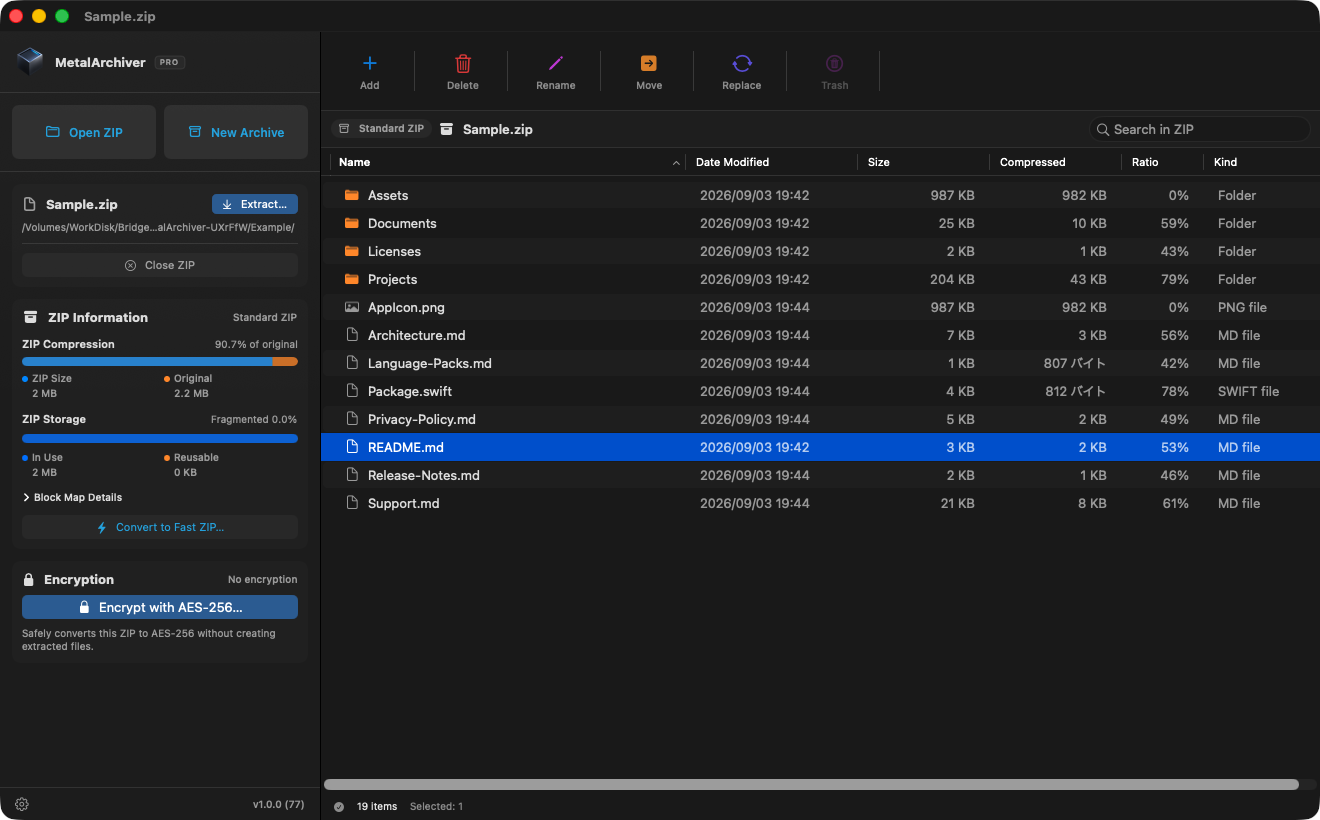
MetalArchiver browsing the files and folders inside a ZIP
Actual app screenshot · Development build v1.0.0 (77)

Features

For everything you do with a ZIP.

Browse, create, and edit archives in one app, without switching between separate tools.

01

Partial ZIP extraction. Just what you need.

Browse the ZIP and extract only the files or folders you select, without unpacking the entire archive. Partial extraction is included in Free.
02

Search inside your ZIP, without extracting it

Press ⌘F to search file names, folder names, and paths across the entire ZIP, including nested folders. Archive search is included in Free.

03

GPU-powered archive work

Metal accelerates standard ZIP and AES-256 operations. Create standard ZIP-compatible archives that common ZIP tools can extract.

04

Edit without leaving the ZIP

Pro lets you add, replace, rename, and encrypt files in an archive. Organize the contents, then send it on.

Create & edit

Bring files together. Edit them later.

Create a new ZIPFree

Add files and folders, then choose a name and destination. MetalArchiver fast ZIP archives remain standard ZIP-compatible, so recipients can use common ZIP tools.

  1. Choose New Archive
  2. Add the files and folders you want to include
  3. Choose Create, then a name and destination
Organize an existing ZIPPro

Forgot a document? Need to fix a filename? Edit the archive while it is open. Deleted items can be restored from the archive’s own trash.

Add, move, replace
From the toolbar
Rename
return
Move to trash
⌘ delete

Archive editing · Pro

A trash bin. Inside your ZIP.

Deleted a file you still need? Restore it from the archive’s own trash. Watch a real recording of adding, deleting, and restoring a file.

24 seconds, original speed, no audio. Actual development build v1.0.0 (85), Pro, using a sample fast ZIP. The app and sample file names are shown in English. Recording starts after file selection. This is a workflow demo, not a performance comparison.
  1. Add a file

    Add a selected file to the open ZIP without extracting everything and rebuilding the archive by hand.

  2. Move it to ZIP Trash

    Deleted items go to the archive’s own trash, separate from Finder’s Trash. See their original locations and deletion times.

  3. Put it back

    Select an item in ZIP Trash and choose Restore to return it to its original location inside the archive.

Keyboard shortcuts

Keep your hands on the keyboard.

From finding a file to organizing an archive, familiar shortcuts keep your work moving.

Rename and Move to ZIP Trash work while the archive list has focus. Each feature’s Free or Pro availability is the same whether you use the mouse or keyboard.

Encryption · Pro

Before you send it,
give it a password.

Convert a standard ZIP directly into an AES-256 encrypted ZIP, without extracting and recompressing its files first.

You can also create a new encrypted ZIP, change the password on an existing archive, or remove encryption. A strength indicator and confirmation field help you verify the password as you work.

Extracting encrypted ZIPs and removing encryption are available in Free.
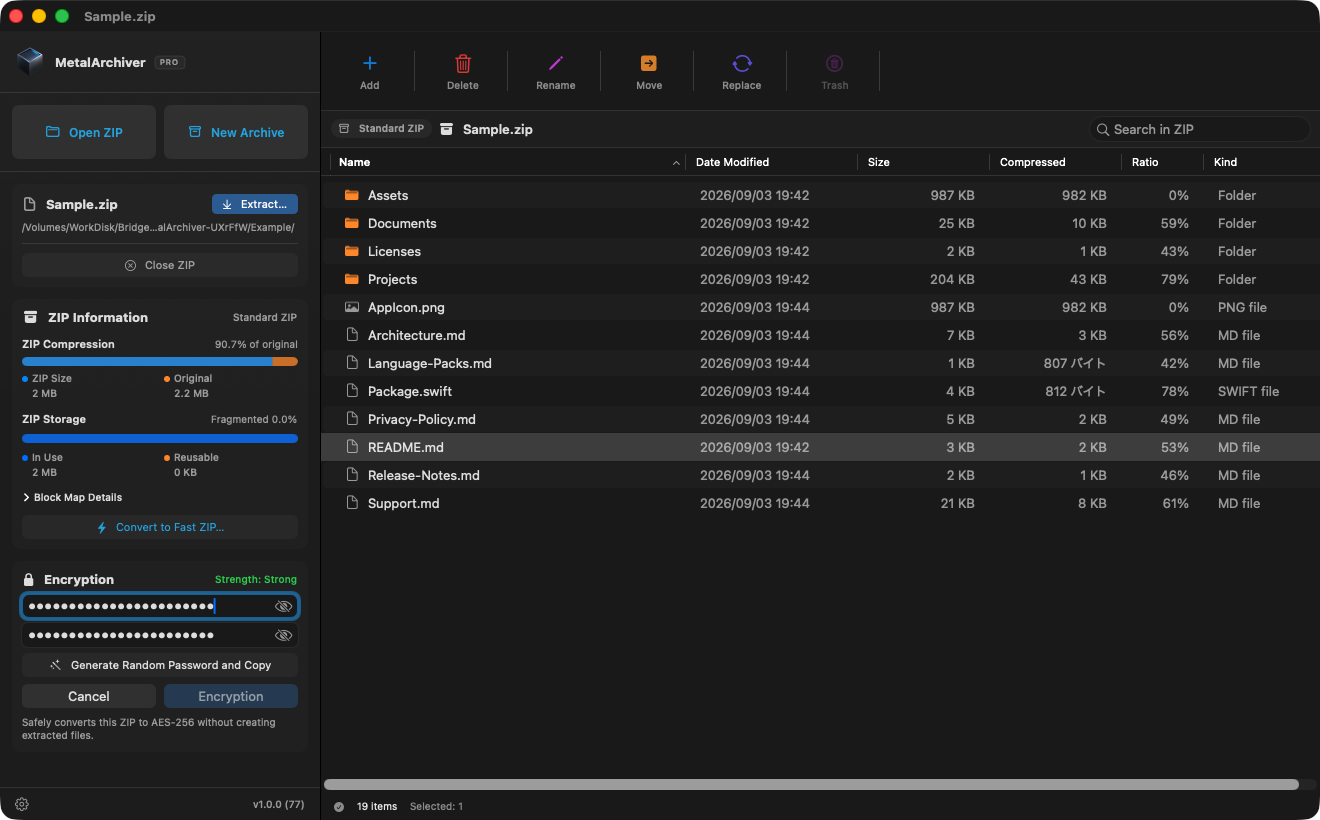
AES-256 password and confirmation fields with the strength indicator in the archive sidebar
Detail of the encryption settings. Click to view the full window.

Performance

Standard and secure encrypted ZIPs, processed at exceptional speed.

For this 1 GB text input, both standard ZIP and AES-256 encrypted ZIP compressed in about 0.4 seconds. Extraction took about 0.08 seconds for standard ZIP and 0.12 seconds for AES-256 ZIP. Archive sizes were about 332 MB.

All results, peer comparisons & methods ↗
enwik9 / 1 GBShorter is faster

Creation time

  1. Standard ZIP371.73 ms
  2. AES-256 ZIP380.54 ms

Extraction time

  1. Standard ZIP81.63 ms
  2. AES-256 ZIP116.03 ms
Standard ZIP332.34 MBFrom original 66.8% smaller
AES-256 ZIP332.41 MBFrom original 66.8% smaller

Measured September 6 on an Apple M4 Max with 64 GiB RAM and macOS 26.6.2. Times include file I/O with startup excluded. Results are for enwik9; performance and encryption overhead vary with input and environment.

MZIX / Standard ZIP compatible

Standard ZIP. More speed.

MetalArchiver combines standard ZIP/ZIP64 with an additional index called MZIX. In MetalArchiver, it enables a fast GPU path for compression and extraction while keeping archive search and editing responsive.

Extraction tests with ZIPs created by MetalArchiver

ApplicationVersionEnvironmentStandard ZIPAES-256
Archive UtilitymacOS 26.6.2 Extraction tested Extraction tested
File ExplorerWindows 64-bit Extraction tested× Not supported by Windows built-in ZIP
7-Zip26.02(arm64)macOS 26.6.2 Extraction tested Extraction tested
WinZip77.1(17093)Windows 64-bit Extraction tested Extraction tested
WinRAR7.23Windows 64-bit Extraction tested Extraction tested
Keka1.6.7macOS 26.6.2 Extraction tested Extraction tested
The Unarchiver4.3.9macOS 26.6.2 Extraction tested Extraction tested

CLI / implementations

ImplementationVersionEnvironmentStandard ZIPAES-256
libarchive(bsdtar)3.7.4macOS 26.6.2 Extraction tested Extraction tested
Info-ZIP(unzip)6.00macOS 26.6.2 Extraction tested× Not supported by implementation

macOS applications and CLI implementations were tested on macOS 26.6.2; Windows applications were tested in a 64-bit environment. Apps that do not understand MZIX can still open standard archives as ordinary ZIP files. The ZIP feature built into Windows File Explorer and Info-ZIP 6.00 do not support AES-256 encryption. On Windows, use a compatible application such as 7-Zip.

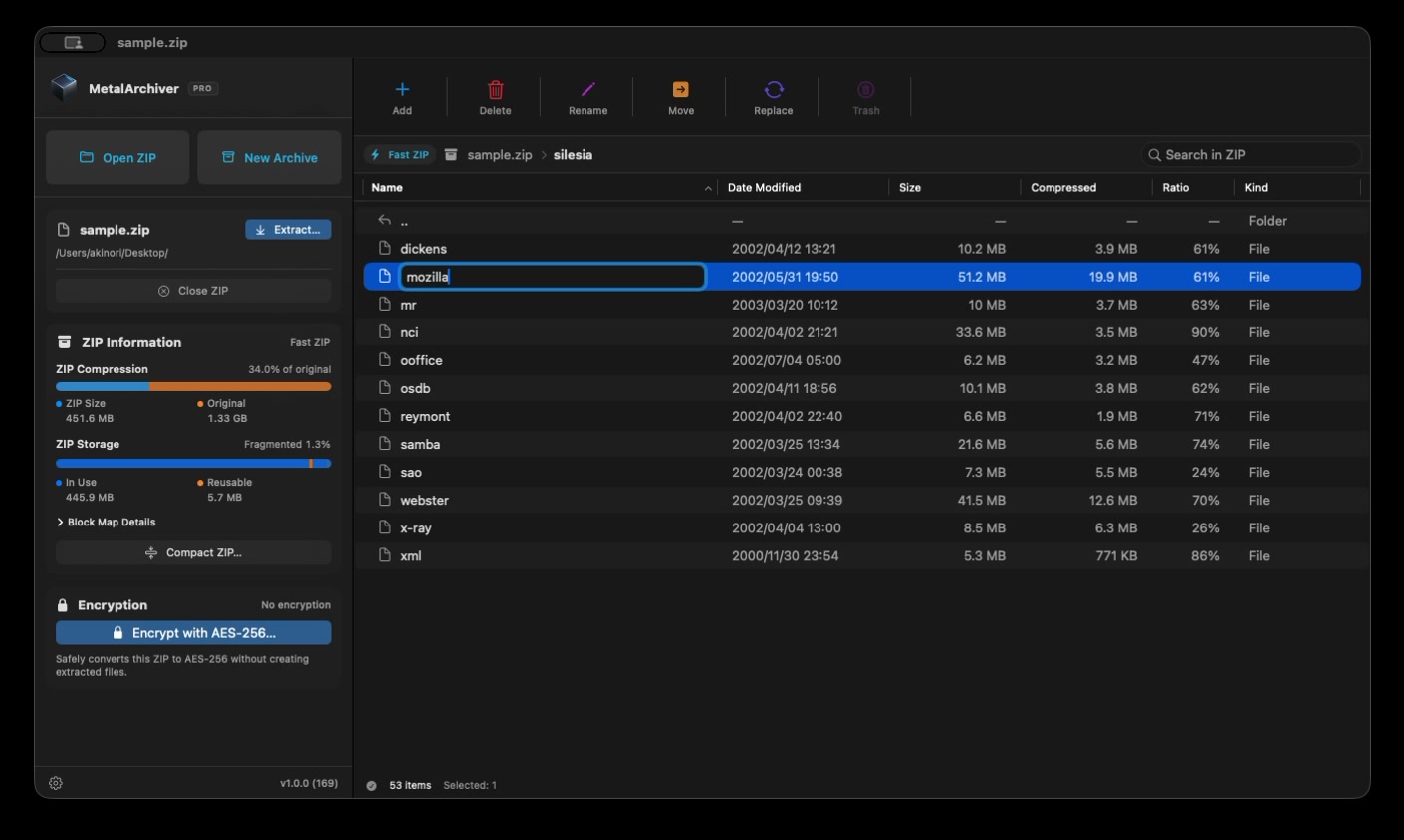
Renaming a file inside a ZIP in MetalArchiver

See it in action

See how it works

Create a ZIP, edit its contents, and restore items from the trash. Follow real demonstrations and step-by-step instructions.

Using MetalArchiver ↗

Free & Pro

Free for the basics. Pro for editing and encryption.

This is the planned offering at launch. Pro is planned as a one-time in-app purchase at a standard price of US$14.99.

Free and Pro feature comparison (planned at launch)
FeatureFreeFree of chargeProUS$14.99 standard price · One-time purchase
Browse ZIP contentsIncludedIncluded
Search inside ZIP archives (file names, folder names, and paths)IncludedIncluded
Extract ZIP and AES-encrypted ZIP archivesIncludedIncluded
Partial ZIP extraction (selected files and folders only)IncludedIncluded
Create and convert fast ZIP archivesIncludedIncluded
Remove AES encryptionIncludedIncluded
Metal acceleration (no size, item-count, or speed limits)IncludedIncluded
Create AES-256 encrypted ZIP archivesNot includedIncluded
Encrypt an existing ZIP with AES-256Not includedIncluded
Change an encrypted ZIP’s passwordNot includedIncluded
Add files and folders to a ZIPNot includedIncluded
Replace a file inside a ZIPNot includedIncluded
Rename files and folders inside a ZIPNot includedIncluded
Move items between folders inside a ZIPNot includedIncluded
Create a new folder inside a ZIPNot includedIncluded
Delete items into the ZIP’s own trashNot includedIncluded
Restore trashed items to their original locationNot includedIncluded
Permanently delete trashed items or empty ZIP TrashNot includedIncluded
Optimize a ZIP by removing unused spaceNot includedIncluded

✓ Included — Not included. Extracting an encrypted ZIP or removing its encryption requires the correct password.

Items removed by permanent deletion, emptying ZIP Trash, or ZIP optimization cannot be restored. Restore anything you need before proceeding.

MetalArchiver for Mac

Coming to the Mac App Store.

Free for the basics, with a one-time Pro purchase at a standard price of US$14.99 for editing and encryption. The release date and download link will be announced here.

Free download · 14-day Pro trial · US$14.99 standard price · One-time Pro purchase · No automatic charge